
Filtering the message list
The message list can be filtered, when more than one type of message exists.
1. "Filter:"
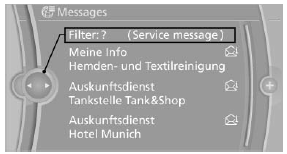
2. Select the type of message.
- "All"
All messages are displayed. - "E-mail"
Only e-mails from the mobile phone are displayed. - "Service message"
Only messages from the BMW Assist Concierge service, My Info and BMW Info are displayed. - "Text message"
Only text messages from the mobile phone are displayed.
See also:
Vehicle battery
Maintenance
The battery is maintenance-free, i.e., the electrolyte
will last for the life of the battery.
Your service center will be glad to advise you on
questions regarding the battery.
Batt ...
Requirements
▷ The installed BMW Assist system is logged
in to a wireless communications network.
This network must be capable of transmitting
the services.
▷ To transmit position data, the vehic ...
headlamp flasher
1. High beams
2. Headlamp flasher
3. Turn signal
Using turn signalsPress the lever beyond the resistance point. To turn off manually, press the
lever to the resistance point.
Unus ...