
New contact
General information
A contact can have up to 8 phone numbers, 2 addresses, 3 e-mail addresses and one Internet address.
1. "Office"
2. "Contacts"
3. Open "Options".
4. "New contact"
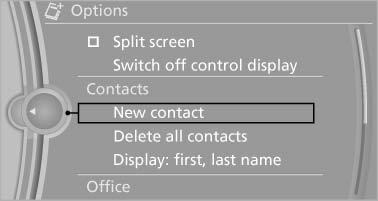
5. The entry fields are still filled with the previous entries: "Delete input fields"
6. Fill in the entry fields: select the symbol next to the entry field.
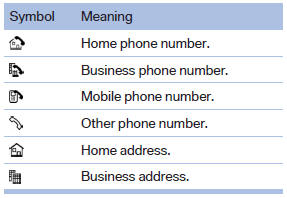
7. Enter the text and assign the contact type.
8. If the vehicle is equipped with a navigation system: Enter the address. Only addresses contained in the navigation data in the vehicle can be entered. This ensures that destination guidance is possible for all addresses. If necessary, "Accept address".
9. "Store contact in vehicle"
Contact types
Various contact types can be assigned to phone numbers and addresses.
Specifying the home address
A home address can be stored. It appears at the top of the contact list.
1. "Home"
2. Create a contact.
3. "Store contact in vehicle"
See also:
Date
The date is displayed in the instrument
cluster.
Setting the date and date format. ...
Belt-force limiter
The effect of the belt-force limiter on the driver's
seat is dependent on the position of the driver's
seat.
To maintain the long-term accuracy of this function,
the driver's seat must be calib ...
Braking safely
Your vehicle is equipped with ABS as a standard
feature.
Applying the brakes fully is the most effective
way of braking in situations when this is necessary.
The vehicle maintains steering respo ...