
The concept
This system projects important information into the driver's field of vision, e.g., navigation instructions.
In this way, the driver can get information without averting his or her eyes from the road.
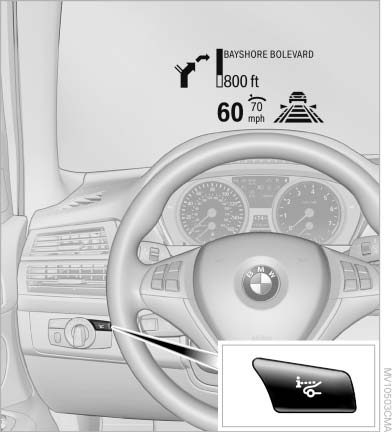
The concept
See also:
Traffic Jump
Traffic and weather information for a selected
region is broadcast every few minutes.
Selecting a region
1. "Radio"
2. "Satellite radio"
3. Open "Options".
4. &quo ...
Front: manual transmission
Opening
Press on the cover.
Emptying
Take out the insert.
Lighter
Push in the lighter.
The lighter can be removed as
soon as it pops back out.
Danger of burns
Only hold the hot lighter b ...
Switching the split screen on and off
1. Press the button.
2. "Split screen"
3. Move the controller until the split screen is
selected.
4. Press the controller or select "Split screen
content".
5. Select the d ...