
Received calls
Displaying calls
The 20 calls that were last received are displayed.
1. "Telephone"
2. "Received calls"
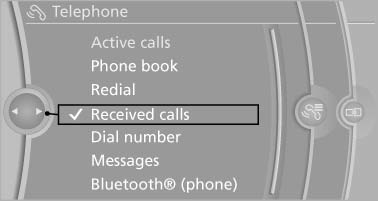
Calling a number from the list
Selecting an entry.
The connection is established.
Saving an entry in the contacts
1. Highlight the entry.
2. Open "Options".
3. "Store as new contact" or "Add to existing
contact"
4. Select
 "New phone number" or contact.
5. Select the type of number: "Home",
"Business", "Mobile" or "Other"
6. Complete the entries if necessary.
7. If necessary, "Store contact in vehicle".
See also:
Contacts
General informationContacts can be created and edited. The contacts from the mobile phone are displayed
as well, if this function is supported by the mobile phone. The addresses can be
used as des ...
Vehicle equipment
All standard, country-specific and optional
equipment that is offered in the model series is
described in this chapter. Therefore, equipment
is also described that is not available in a vehicle, ...
Switching the warning function on/off
Switching the warning function on/off
Press the button
▷ On: the LED lights up.
▷ Off: the LED goes out.
The state is stored for the remote control currently
in use. ...