
Calls with multiple participants
General information
You can switch between calls or connect two calls to a single conference call. These functions must be supported by the mobile phone and service provider.
Accepting a call while speaking to another party
This function might have to be activated by the service provider and the mobile phone must be adjusted accordingly.
If a second call comes in during an ongoing call, a call waiting signal is sounded where appropriate.
 "Accept"
The call is accepted and the existing call is put on hold.
Establishing a second call
Establish an additional call during an active call.
1. "Telephone"
2. "Active calls"
3. "Hold"
The existing call is put on hold.
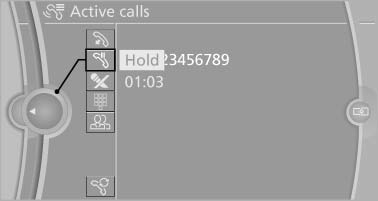
4. Dial the new phone number or select it from a list.
 "Return"
The call on hold is resumed.
Switching between two calls, hold call
The active call is displayed in color.
The call on hold is displayed in gray.
 "Swap calls"
The call on hold is resumed.
Establishing a conference call
Two calls can be connected to a single telephone conference call.
1. Establish two calls.
2.
 "Conference call"
When terminating a conference call, both calls are ended. If one call is terminated by another party, the other call can be continued.
See also:
Selecting menu items
Menu items shown in white can be selected.
1. Turn the controller until the desired menu
item is highlighted.
2. Press the controller.
Menu items in the Owner's Manual
In the Owner's Manual, m ...
Contacts
Note
If equipped with full mobile phone preparation
package.
At a glance
Contacts can be created and edited. The contacts
from the mobile phone are displayed as
well if this function is supporte ...
At a glance
1 Control button
2 Mirror display ...