
iDrive in the rear
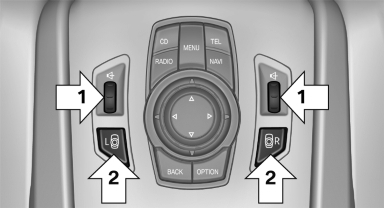
Operation is the same as for the iDrive in the front.
- To adjust the volume: turn, arrows 1.
- To activate the controller and switch between the screens: press the buttons, arrows 2.
A green LED indicates which screen is active and can be operated via the iDrive in the rear.
See also:
Overview of the information
Repeatedly pressing the button on the turn signal
lever displays the information on the instrument
cluster in the following order:
▷ Range.
▷ Average speed<>.
▷ Average ...
Preselecting activation times
1. "Settings"
2. "Climate"
3. "Activate Timer 1" or "Activate Timer 2"
4. "Timer 1:" or "Timer 2:"
Preselecting activation times
5. S ...
High-beam Assistant
When the lights are switched on, this system
automatically switches the high beams on and
off. The procedure is controlled by a sensor on the front of the interior
rearview mirror. The assistant ...