
Rear CD/DVD player
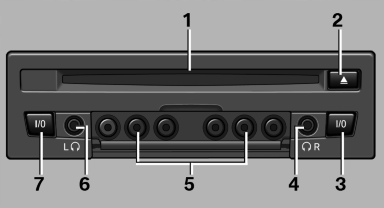
1 CD/DVD slot
2 Eject CD/DVD
3 On/off, right
4 Headphone connection, right
5 RCA sockets
6 Headphone connection, left
7 On/off, left
See also:
Vehicle equipment
All standard, country-specific and optional
equipment that is offered in the model series is
described in this chapter. Therefore, equipment
is also described that is not available in a vehicle, ...
Components of the
integrated Owner's Manual
The integrated Owner's Manual consists of
three parts, which offer various levels of information
or access possibilities.
Quick Reference Guide
Located in the Quick Reference is important inform ...
Vehicle equipment
All standard, country-specific and optional
equipment that is offered in the model series is
described in this chapter. Therefore, equipment
is also described that is not available in a vehicle, ...