
Rear CD/DVD player
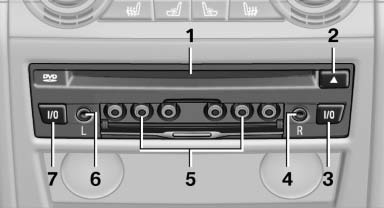
1 CD/DVD slot
2 Eject CD/DVD
3 On/off, right
4 Headphone connection, right
5 RCA sockets
6 Headphone connection, left
7 On/off, left
See also:
Tire inflation pressure values over
100 mph/160 km/h
740i, 740Li, 750i, 750Li
Without high-speed tuning feature
760i, 760Li
Without high-speed tuning feature
With high-speed tuning feature
750i xDrive, 750Li xDrive
Without high-speed tun ...
Engine oil temperature
Cold engine: the pointer is at
the low temperature end.
Drive at moderate engine and
vehicle speeds.
Normal operating temperature:
the pointer is in the middle
or in the left hal ...
TRACTION
When TRACTION is active, the vehicle has maximum
traction on loose road surfaces. DTC Dynamic
Traction Control, refer to page 105, is activated.
Driving stability is limited during
acceleration ...