
Controls
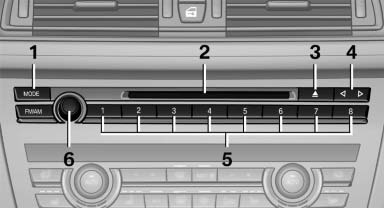
1 Change the entertainment source
2 CD/DVD* drive
3 Eject CD/DVD
4 Change station/track
5 Programmable memory buttons
6 Volume, on/off
See also:
Manual destination entry
General information
The system supports you in entering street
names and house numbers by automatically
completing the entry and providing entry comparisons,
refer to page 21.
Stored town/city ...
Switching the microphone to mute
When a call is active, the microphone can be
muted.
1. "Telephone"
2. "Active calls"
3. "Microphone mute"
A microphone that has been switched to mute
is automati ...
Notes
Replacing fuses
Never attempt to repair a blown fuse and
do not replace a defective fuse with a substitute
of another color or amperage rating; this could
lead to a circuit overload, ultimatel ...