
Traffic Jump
Traffic and weather information for a selected region is broadcast every few minutes.
Selecting a region
1. "Radio"
2. "Satellite radio"
3. Open "Options".
4. "Set jump"
5. Select the desired region.
The region is stored for the remote control currently in use.
Activating/deactivating the jump
1. "Radio"
2. "Satellite radio"
3.  "Jump to:"
Information for the selected region is broadcast
as soon as it is available.
A new panel opens.
Canceling the Traffic Jump: "Cancel".
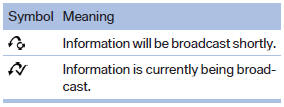
Select one of the symbols to deactivate Traffic Jump.
See also:
Switch off the engine during longer
stops
Switch off the engine during longer stops, e.g.,
at traffic lights, railroad crossings or in traffic
congestion.
Fuel savings are achieved after the vehicle is
switched off for only approx. 4 s ...
Special destinations
General information
Even with the most current navigation data, information
regarding particular individual destinations
may have changed. For instance, certain
gas stations may not be operating.
...
System limits
Speed range
Best results are achieved when using the system
on well-developed roads and highways.
The desired speed can be selected between
20 mph/30 km/h to 110 mph/180 km/h.
The system can a ...