
Opening the favorites
If an activated favorite is played back, the following message appears for approx. 20 seconds: "Favorite alert!".
 "Favorites"
Select the symbol while the message is shown.
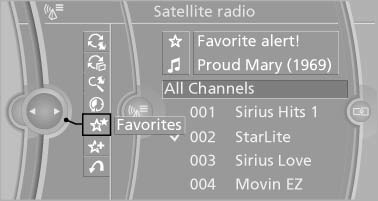
The displayed favorite is played.
If there is no message, the system changes to the My Favorites category. All favorites currently being broadcast can be selected from a list.
See also:
Electrically adjustable seats
At a glance
1 Backrest width
2 Lumbar support
3 Forward/backward, height, seat tilt
4 Backrest tilt
5 Seat and mirror memory for driver's seat
Note
The seat setting for the driver's seat is s ...
Settings for the map view
The settings are stored for the remote control
currently in use.
1. "Navigation"
2. "Map"
3. "Options" Open.
4. "Settings"
Set the map view.
▷ &qu ...
Low tire pressure message
The yellow warning lamp
lights up. A
Check Control message is displayed.
► There is a flat tire or a major loss in
tire inflation pressure.
► The system was not reset after ...