
Storing favorites
Up to 30 favorites can be stored in the favorites list. Available favorites are artist, track, game, league, and team.
Storing the artist, track, or game
It is only possible to store favorites that are currently being broadcast. The channel information must be available.
1. "Radio"
2. "Satellite radio"
3. If necessary, open "All channels" or the desired category.
4. Select the desired channel.
5. Press the controller again.
6. Select the artist, track, or game.
Storing the league or team
Leagues or teams can be added to the favorites from a selection list.
1. "Radio"
2. "Satellite radio"
3.  "Manage favorites"
4. "Add sports information"
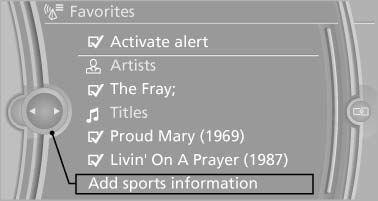
5. Select the league.
6. Select "Add all teams" or the desired team.
See also:
Malfunction
The small warning
lamp flashes in yellow
and then lights up continuously;
the larger warning lamp comes on in
yellow. On the Control Display, the
tires are shown in gray and a message appear ...
Vehicle Overview
The rear-wheel-drive BMW 1 Series enters its fifth year on the market with a
few visual changes, as well as a new higher-performance version from BMW's M
division, dubbed the 1 Series M. At the ot ...
Last destinations
At a glance
The destinations previously entered are stored
automatically.
The destinations can be called up and used as a
destination for destination guidance.
Calling up the last destination
...