
Changing the list view
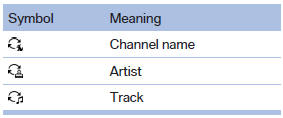
The list view changes every time the first symbol on the navigation bar is pressed.
Information on the channel is displayed.
See also:
Malfunctions
Steering wheel vibration
Frequent activation of the steering wheel vibration
causes the system to overheat.
This causes the lane departure warning to become
deactivated.
Let the system cool and ...
At a glance
The concept
Mobile phones or other external devices such as
audio players can be connected to the vehicle
via Bluetooth.
After these devices are paired once, they are
recognized automatically ...
Programmable memory buttons
General information
The iDrive functions can be stored on the programmable
memory buttons and called up directly,
e.g., radio stations, navigation destinations,
phone numbers and entry points i ...