
Controls
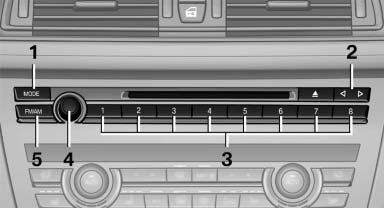
1 Change entertainment sources
2 Change station/track
3 Programmable memory buttons
4 Volume, on/off
5 Change wave band
See also:
Fold-out position of the wipers
Required when changing the wiper blades or
under frosty conditions, for example.
1. Switch off the ignition.
2. Under frosty conditions, ensure that the
wiper blades are not frozen onto the wind ...
Switching on/off and interrupting cruise control
Switching on
Press the button on the steering wheel.
The indicator lamps in the instrument cluster
light up and the mark in the speedometer is set
to the current speed.
Cruise control can ...
Vehicle equipment
All standard, country-specific and optional
equipment that is offered in the model series is
described in this chapter. Therefore, equipment
is also described that is not available in a vehicle,
e ...