
Volume
- "Speed volume": speed-dependent volume control.
- "PDC": volume of the PDC signal* compared to the entertainment sound output.
- "Gong": volume of the signal, such as the safety belt reminder, compared to the entertainment sound output.
- "Microphone": volume of the microphone* during a phone call.
- "Loudspeak.": volume of the loudspeakers* during a phone call.
The following volumes are only stored for the respective paired telephone: "Microphone", "Loudspeak.".
Adjusting the volume
1. "CD/Multimedia", "Radio" or "Settings"
2. "Tone"
3. "Volume settings"
4. Select the desired volume setting.
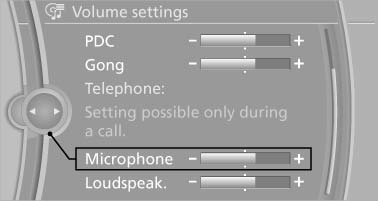
5. To adjust: turn the controller.
6. To store: press the controller.
See also:
Vehicle equipment
All standard, country-specific and optional
equipment that is offered in the model series is
described in this chapter. Therefore, equipment
is also described that is not available in a vehicle, ...
Calling up settings
Do not retrieve the memory while driving
Do not retrieve the memory setting while
driving, as an unexpected movement of the seat
or steering wheel could result in an accident.
Comfort function
...
After refilling diesel exhaust fluid
Incorrect fluid
Incorrect fluids
After refilling with the incorrect fluid, e.g.,
antifreeze for windshield wiper fluid, do not start
the engine because this could result in a fire
hazard. ...