
Route criteria
General information
- The route calculated can be influenced by selecting certain criteria.
- The route criteria can be changed when the destination is entered and during destination guidance.
- Road types are part of the navigation data and are taken into consideration when planning a route, e.g., avoid highways.
- The recommended route may differ from the route you would take based on personal experience.
- The settings are stored for the remote control currently in use.
- Destination guidance with traffic bulletins.
Changing the route criteria
1. "Navigation"
2. "Map"
3. 

 "Route preference"
4. Select the criterion:
- "Fast route": time-optimized route, being a combination of the shortest possible route and the fastest roads.
- "Efficient route": optimized combination of the fastest and shortest route.
- "Short route": short distance, irrespective of how fast or slow progress will be.
- "Alternative routes": if available, alternative routes are suggested during active route guidance. The individual suggestions are highlighted in color.
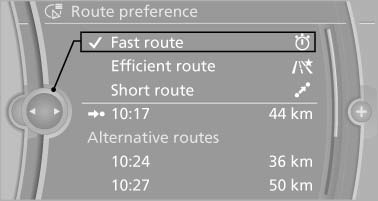
5. Specify additional criteria for the route, if necessary:
- "Avoid highways": highways are avoided wherever possible.
- "Avoid toll roads": toll roads are avoided wherever possible.
- "Avoid ferries": ferries are avoided where possible.
See also:
Calling up settings
Do not retrieve the memory while driving
Do not retrieve the memory setting while
driving, as an unexpected movement of the seat
or steering wheel could result in an accident.
Comfort function
...
The right place for children
Note
Children in the vehicle
Do not leave children unattended in the
vehicle; otherwise, they could endanger themselves
and other persons, e.g., by opening the
doors.◄
Children should alw ...
Displaying a list of route sections
When destination guidance has been started, a
list of the route sections can be displayed. The
driving distance and traffic bulletins are displayed
for each route section.
1. "Navigation&q ...