
Last destinations
At a glance
The destinations previously entered are stored automatically.
The destinations can be called up and used as a destination for destination guidance.
Calling up the last destination
1. "Navigation"
2. "Last destinations"
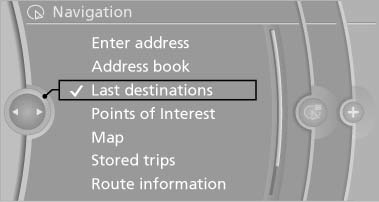
Starting destination guidance
1. "Navigation"
2. "Last destinations"
3. Select the destination.
4. "Start guidance"
Editing the destination
1. "Navigation"
2. "Last destinations"
3. Highlight the destination.
4. Open "Options".
5. "Edit destination"
Deleting the last destinations
1. "Navigation"
2. "Last destinations"
3. Highlight the destination.
4. Open "Options".
5. "Delete entry" or "Delete all last
destinations"
See also:
Switch off any functions that
are not currently needed
Functions such as seat heating and the rear window
defroster require a lot of energy and consume
additional fuel, especially in city and stopand-
go traffic.
Therefore, switch off these functio ...
Ride & Handling
The X5 finds a sweet spot between SUV ride comfort and BMW athleticism — far
better than the X6, which is two parts BMW to one part SUV. The X5's ride
quality is very good, as the suspension isola ...
Strength of the driver's and front
passenger airbag
The strength with which the driver's and front
passenger airbags are triggered depends on the
position of the driver's and front passenger
seats.
To maintain the accuracy of this function over ...