
Display
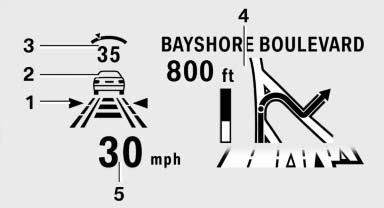
1 Lane departure warning*
2 Active Cruise Control*
3 Desired speed
4 Navigation system*
5 Speed
The collision warning*, Night Vision* pedestrian warning, or Check Control messages are displayed briefly if needed.
Selecting displays in the Head-up Display
1. "Settings"
2. "Head-up display"
3. "Displayed information"
4. Select the desired displays in the Head-up
Display.
The settings are stored for the remote control currently in use.
Setting the brightness
The brightness is automatically adjusted to the ambient light.
The basic setting can be adjusted manually.
1. "Settings"
2. "Head-up display"
3. "Brightness"
4. Turn the controller.
The brightness is adjusted.
When the low beams are switched on, the brightness of the Head-up Display can be additionally influenced using the instrument lighting.
The setting is stored for the remote control currently in use.
Adjusting the height
1. "Settings"
2. "Head-up display"
3. "Height"
4. Turn the controller.
The height is adjusted.
The setting is stored for the remote control currently in use.
See also:
Active head restraint
In the event of a rear-end collision with a certain
severity, the active head restraint automatically
reduces the distance from the head.
Reduced protective function
▷ Do not use seat or ...
An extensive range of standard and optional BMW ConnectedDrive functions.
BMW ConnectedDrive comprises all offers and technologies which connect our
vehicles, drivers and passengers, and the outside world. ConnectedDrive is
comprised of three main pillars: Convenience, ...
System limits
Sudden tire damage
Sudden serious tire damage caused by
external influences cannot be indicated in advance.◄
The system does not operate correctly if it has
not been reset. For example, a f ...