
Contacts
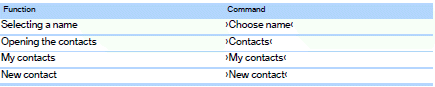
See also:
Notes
No loose objects in the
passenger compartment
Do not stow any objects in the passenger compartment
without securing them; otherwise,
they may present a danger to occupants for instance
durin ...
Instrument cluster
At a glance
1 Fuel gauge
2 Speedometer
3 Indicator/warning lamps
4 Tachometer
5 Engine oil temperature
6 Electronic displays
7 Reset miles ...
DTMF suffix dialing
DTMF suffix dialing can be used for gaining access
to network services or for controlling devices,
e.g., to make a remote inquiry of an answering
machine. The DTMF code is needed for this
purpose. ...