
Visual warning
The approach of the vehicle to an object can be shown on the Control Display.
When the distance to an object is small, a red bar is shown in front of the vehicle, as it is in the PDC display.
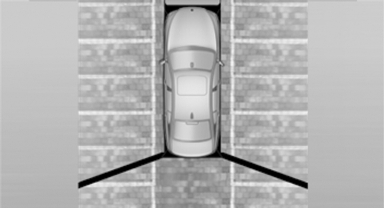
The display appears as soon as Top View is activated.
If the backup camera image was selected last, it again appears on the display. To switch to Top View:
 "Rear view camera" Select the
symbol on
the Control Display.
"Rear view camera" Select the
symbol on
the Control Display.
The setting is stored for the remote control currently in use.
See also:
Adjusting electrically
Adjusting electrically
1. Forward/backward
2. Height
3. Seat tilt
Backrest
4. Backrest
Differs depending on seat:
Differs depending on seat
1. Backrest
2. Height
Additional depending o ...
Cupholders
Notes
Shatter-proof containers and no hot
drinks
Use light and shatter-proof containers and do
not transport hot drinks. Otherwise, there is the
increased danger of injury in an accident.` ...
Interior motion sensor
The windows and glass sunroof must be closed
for the system to function properly ...