
Display on the Control Display
The traffic area to the left and right is displayed on the Control Display.
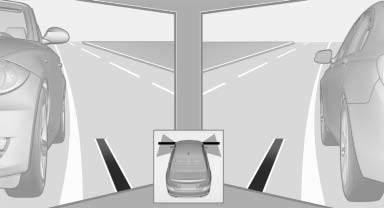
Guidelines at the bottom of the image show the position of the front of the vehicle.
Brightness
With the Side View switched on:
1.  "Brightness"
2. Turn the controller until the desired setting is reached and press the controller.
Contrast
With the Side View switched on:
1.  "Contrast"
2. Turn the controller until the desired setting is reached and press the controller.
See also:
Actions in the event of a flat tire
Run-flat tires
You can continue driving with a damaged tire at
speeds up to 50 mph/80 km/h.
Do not continue driving without run-flat
tires
If the vehicle is not equipped with run-flat tires
...
Lumbar support
The curvature of the seat backrest can be adjusted
in such a way that it supports the lumbar
region of the spine. The lower back and the
spine are supported for upright posture.
► Press the ...
Reminders
Displaying remindersReminders for imminent appointments and tasks are displayed. After an appointment
has passed or a task is due, the reminder is no longer displayed.
1. "Office"
...