
Displays in the instrument cluster
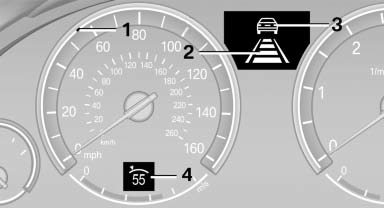
1 Display of desired speed
2 Distance to vehicle ahead of you
3 Vehicle symbol
4 Brief status display
Desired speed
Marking in the speedometer
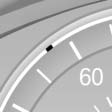
- The marking lights up in green: the system is active.
- The marking lights up in orange: the system has been interrupted.
- The marking does not light up: the system is switched off.
Brief status display

Selected desired speed.
If --- appears briefly on the display for Check Control messages, it is possible that the system requirements for operation are currently not met.
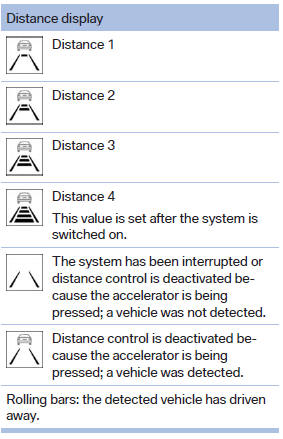
Distance to vehicle ahead of you
The selected distance to the vehicle driving ahead of you is shown.
Indicator/warning lamps
 Personal responsibility
The indicator and warning lamps do not relieve the driver of the responsibility to adapt his or her desired driving speed and style to the traffic conditions.
 The vehicle symbol lights up in
orange:
The vehicle symbol lights up in
orange:
A vehicle has been detected ahead of you.
The vehicle symbol flashes
orange:
The conditions are not adequate for operating the system.
The system was deactivated but applies the brakes until you actively assume control by pressing on the brake pedal or accelerator.
The vehicle symbol flashes red
and an
acoustic signal sounds:
You are requested to intervene by braking or making an evasive maneuver.
See also:
General information
The vehicle is supplied with two remote controls
with keys.
Every remote control contains a replaceable
battery.
The settings called up and implemented when
the vehicle is unlocked depend on w ...
Head airbags
In a lateral impact, the head airbag supports the
head. ...
Opening the Options menu
Press the button.
The "Options" menu is displayed.
Additional options: move the controller to the
right repeatedly until the "Options" menu is displayed.
Options menu
The ...