
Hiding Check Control messages
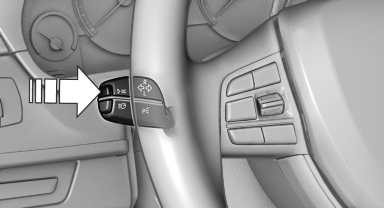
Press the computer button on the turn signal lever.
- Some Check Control messages are displayed continuously and are not cleared until the malfunction is eliminated. If several malfunctions occur at once, the messages are displayed consecutively. These messages can be hidden for approx. 8 seconds. After this time, they are displayed again automatically.
- Other Check Control messages are hidden automatically after approx. 20 seconds. They are stored and can be displayed again later.
See also:
Notes
Steam jets or high-pressure washers>?
When using steam jets or high-pressure
washers, hold them a sufficient distance away
and use a maximum temperature of 140 ℉/
60 ℃.
Holdin ...
System limits
Personal responsibility
The high-beam assistant cannot serve as
a substitute for the driver's personal judgment
of when to use the high beams. Therefore, manually
switch off the high beams in ...
Wheels and tyres
The new BMW 3-Series Sedans are factory-fitted with attractively styled,
high-quality alloy wheels. The BMW 335i and BMW 328i run on 17-inch Star-spoke
wheels carrying 225/50 R17 tyres. The BMW 32 ...