
Displaying information on the instrument panel
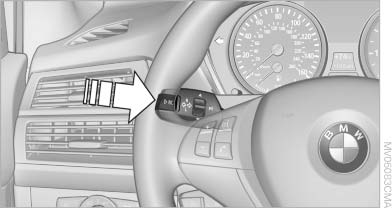
Displaying information on the
instrument panel
Press the computer button on the turn signal lever.
Information is displayed in the instrument cluster.
See also:
Video playback
Country codes
Only DVDs with the code of the home region can
be played back; also refer to the information on
the DVD.
Playback
The video image is displayed on the front Control
Display u ...
Status field symbols
The symbols are grouped as follows.
Radio symbols
Telephone symbols
Entertainment symbols
Additional symbols
...
The concept
This system can be used to select a desired
speed that the vehicle will maintain automatically
on clear roads.
To the extent possible, the system automatically
adjusts the speed to a slower veh ...