
Speed limit
Display of a speed limit which, when reached, should cause a warning to be issued.
Renewed warning if the vehicle speed drops below the set speed limit once by at least 3 mph/ 5 km/h.
Displaying, setting or changing the limit
1. "Settings"
2. "Speed"
3. "Warning at:"
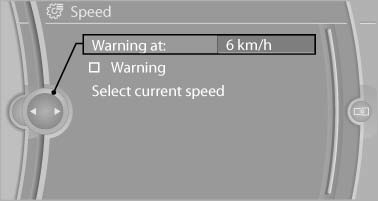
4. Turn the controller until the desired limit is displayed.
5. Press the controller.
The speed limit is stored.
Activating/deactivating the limit
1. "Settings"
2. "Speed"
3. "Warning"
4. Press the controller.
Applying your current speed as the limit
1. "Settings"
2. "Speed"
3. "Select current speed"
4. Press the controller.
The current vehicle speed is stored as the limit.
See also:
Individual protection at every seat
The exemplary crash responses of the new BMW 3-Series Sedan body also provide
the best possible basis for the optimum design and set-up of the car's restraint
systems. The sports sedan is equipped ...
Notes
Displaying notes1. "Office"
2. "Notes"
All notes are displayed.
Displaying a note1. Select the desired note.
2. To scroll through the note, if necessa ...
Loss of the remote controls
Lost remote controls can be blocked by your
service center. ...