
Adjusting the info display
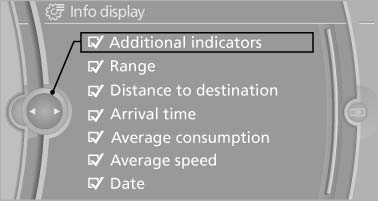
You can select what information from the computer is to be displayed on the info display of the instrument cluster.
1. "Settings"
2. "Info display"
3. Select the desired displays.
See also:
Ignition on
Press the Start/Stop button, and do not press on
the brake pedal at the same time.
All vehicle systems are ready for operation.
Most of the indicator and warning lamps in the
instrument cluster ...
Audio/video playback
Audio
Audio can be played back via rear entertainment
from any source in the vehicle.
Operation is the same as for the front audio playback.
Video
Video can be played back in the rear from the
...
Continuing destination guidance
If the destination was not reached during the last
trip, destination guidance can be resumed.
"Resume guidance" ...