
Front seat heating
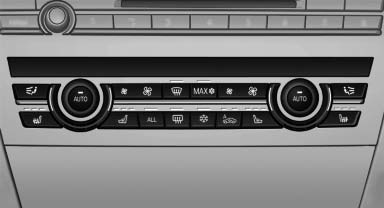
Switching on
 Press the button once for each
temperature
level.
The maximum temperature is reached when three LEDs are lit.
Switching off
Press the button longer.
The LEDs go out.
The temperature may be reduced or seat heating may be switched off entirely to save battery power.
Temperature distribution
The heating action in the seat cushion and backrest can be distributed in different ways.
1. "Climate"
2. "Seat heating distribution"
3. Select the required seat.
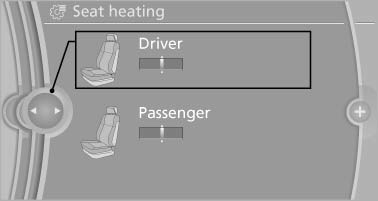
4. Turn the controller to set the temperature distribution.
See also:
System limits
Changes to the parking space
Changes to the parking space after it was
measured are not taken into account by the system.
Therefore, always be alert and ready to intervene;
otherwise, there is ...
Switching on/off manually
Switching on/off manually
Press the
button.
▷ On: the LED lights up.<>
▷ Off: the LED goes out. ...
Destination guidance with traffic bulletins
General information
Detour suggestions from the navigation system
can be manually accepted in the semi-dynamic
destination guidance. In the dynamic destination
guidance, they are automatically ...