
Opening/closing the sliding visor
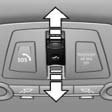
- Press the switch in the desired direction to the resistance point and hold it there. The sliding visor moves while the switch is being held.
- Press the switch in the desired direction past the resistance point. The sliding visor moves automatically. Pressing the switch again stops the motion.
See also:
Entering a state/province
1. Press the
button.
2. "Navigation"
3. "Enter address"
Enter address
4. Select "State/Province" or the displayed
state/province. ...
Changing, maintaining, and storing the
speed
The rocker switch can be pressed while the system
is interrupted to maintain and store the current
speed. DSC Dynamic Stability Control is
switched on, if necessary.
Adapting the desired speed ...
Ventilation in rear, center
▷ Thumbwheels for adjusting the temperature,
arrows 1.
Toward blue: colder.
Toward red: warmer.
▷ Lever for changing the air flow direction, arrow
2.
▷ Thumbwheels for open ...