
Integrated key
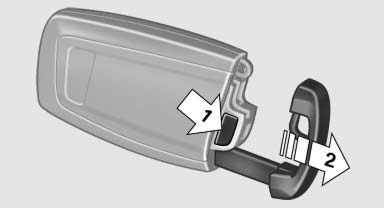
Press the button on the back of the remote control, arrow 1, and pull out the key, arrow 2.
The integrated key fits the following locks:
- Driver's door.
- Trunk lid.
- Storage compartment in the front center armrest.
The storage compartment contains a switch for separately securing the trunk lid.
Replacing the battery
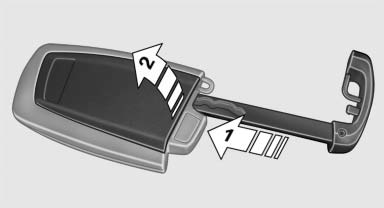
1. Take the integrated key out of the remote
control.
2. Push in the catch with the key, arrow 1.
3. Remove the cover of the battery compartment;
see arrow 2.
4. Insert a battery of the same type with the
positive side facing upwards.
5. Press the cover closed.
 Take the used
battery to a recycling center
or to your service center.
Take the used
battery to a recycling center
or to your service center.
New remote controls
You can obtain new remote controls from your service center.
Loss of the remote controls
Lost remote controls can be blocked by your service center.
Emergency detection of remote control
It is possible to switch on the ignition or start the engine in situations such as the following:
- Interference of radio transmission to remote control by external sources.
- Discharged battery in the remote control.
A Check Control message is displayed if an attempt is made to switch on the ignition or start the engine.
Starting the engine in case of emergency detection of remote control
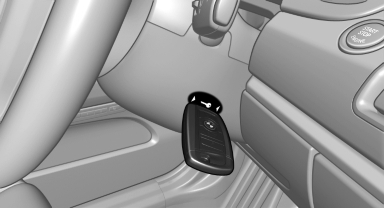
If a corresponding Check Control message appears, hold the remote control, as shown, against the marked area on the steering column and press the Start/Stop button within 10 seconds while pressing the brake.
See also:
Выбираем жидкость для омывания стекол
Автомобильные «дворники» появились около 80 лет назад, омыватели ветровых стекол – чуть больше полувека. Незамерзающие жидкости, зовущиеся в народе «омывайками», &ndas ...
Indicator/warning lamps
The indicator lamp flashes: DSC controls
the drive forces and brake forces.
The indicator lamp lights up: DSC has
failed. ...
The concept
The vehicle can be accessed without activating
the remote control.
All you need to do is to have the remote control
with you, e.g., in your jacket pocket.
The vehicle automatically detects the ...