
Components of the integrated Owner's Manual
The integrated Owner's Manual consists of three parts, which offer various levels of information or access possibilities.
Quick Reference Guide
Located in the Quick Reference is important information for the operation of the vehicle, the operation of basic vehicle functions or for what to do in the event of a flat tire. This information can also be displayed during driving.
Search by pictures
Information and descriptions based on illustrations can be searched via search by pictures. This is helpful, for example, if the description of an outfitting package that cannot be named is needed.
Owner's Manual
Information and descriptions can be searched by direct entry of a search term via the index.
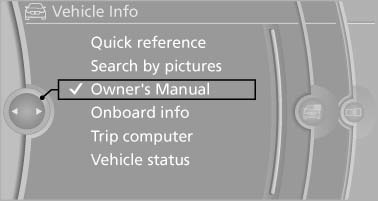
Select components
1. Press the button.
2. Turn the controller: open "Vehicle Info".
3. Press the controller.
4. Selecting desired range:
- "Quick reference"
- "Search by pictures"
- "Owner's Manual"
See also:
Equalizer
Setting for individual audio frequency ranges.
Adjusting the equalizer
1. "CD/Multimedia", "Radio" or "Settings"
2. "Tone"
3. "Equalizer"
4. Sele ...
Storage periods
Storage periods during which the vehicle battery
was disconnected are not taken into account.
If this occurs, have a service center update the
time-dependent maintenance procedures,
such as che ...
Selection lists in theinstrument cluster
The concept
The following can be operated using the buttons
and the thumbwheel on the steering wheel and
the display in the instrument cluster:
► Current audio source.
► Redial on t ...