
Setting the clock
1.  Press the button. The main
menu is
displayed.
Press the button. The main
menu is
displayed.
2. Turn the controller until "Settings" is highlighted, and then press the controller.
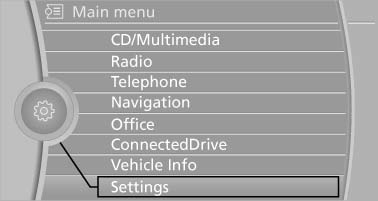
3. If necessary, move the controller to the left to display "Time/Date".
4. Turn the controller until "Time/Date" is highlighted, and then press the controller.
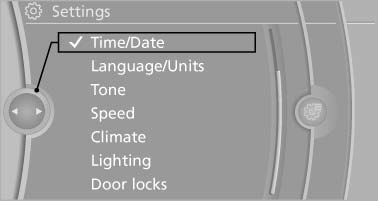
5. Turn the controller until "Time:" is highlighted, and then press the controller.
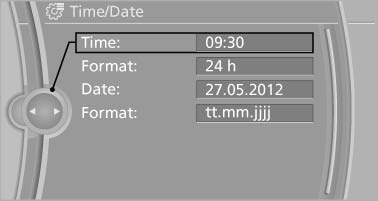
6. Turn the controller to set the hours and press the controller.
7. Turn the controller to set the minutes and press the controller.
See also:
Vehicle equipment
All standard, country-specific and optional
equipment that is offered in the model series is
described in this chapter. Therefore, equipment
is also described that is not available in a vehicle,
e ...
Enabling operation in the rear
Only possible via the iDrive in the front.
1. "Settings"
2. "Allow rear control"
3. Select the desired priority.
...
Mounts for the lower LATCH anchors
Correctly engage the lower LATCH anchors
Make sure that the lower LATCH anchors have
properly engaged and that the child restraint fixing
system is resting snugly against the backrest;
otherwi ...