
Controls
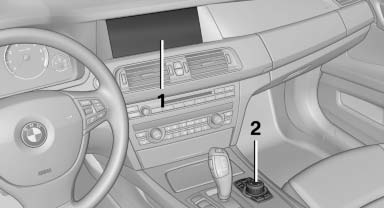
1 Control Display
2 Controller with buttons
The buttons can be used to open the menus directly. The controller can be used to select menu items and create the settings.
See also:
Switching on/off manually
Switching on/off manually
Press the button.
▷ On: the LED lights up.
▷ Off: the LED goes out.
The PDC is shown on the Control Display.
Switch on the backup camera via the iDrive. ...
X3 in the Market
As you can probably guess by now, the market has caught up with and in many
ways passed the X3. That said, if it weren't for BMW's initiative, this segment
might not even exist today, let alone of ...
Opening
During opening, the trunk lid pivots back and up.
Ensure that adequate clearance is available before
opening.
Opening from the outside
▷ Press the button on the trunk lid.
▷ Press ...