
Calendar
Display the calendar
Appointments during the last 20 and the next 50 days can be displayed.
1. "Office"
2. "Calendar"
The appointments on the current day are displayed.
Selecting the calendar day
1. Select the date.
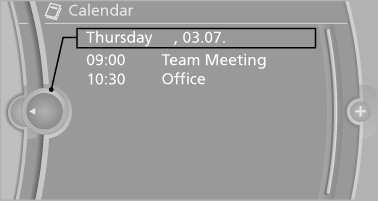
2. Select the desired day or date.
► "Next day"
► "Date:"
► "Previous day"
► "Today"
Display the appointment
1. Select the desired appointment.
2. Scroll through the appointment if necessary:
► Turn the controller.
►

 Select the symbol.
Using contact data
Contact data from appointments, tasks, text messages, e-mails and notes can be saved or selected.
Reading the appointment out loud
Read the appointment out loud.
See also:
Interior: driver-oriented cockpit, exclusive ambience.
The driver-oriented cockpit layout familiar from BMW models down the years
and a dynamic forward-surging movement define the design of the interior. The
centre section of the instrument panel - in ...
Service Request
At a glance
Sends information to your service partner to request
the arrangement of a service appointment.
The TeleService data is transmitted during
a Service Request. If possible, your service ...
TeleService Report
Transmits technical data that is evaluated for the
ongoing development of BMW products from
your vehicle to BMW in regular intervals if necessary.
TeleService Report is activated in vehicles that ...