
Cruise control
The concept
You can use the cruise control feature beginning at approx. 20 mph/30 km/h. The car then stores and maintains the speed that you specify using the lever on the steering column.
 Do not use cruise control when driving at constant
speed is prevented by adverse conditions, e.g. winding roads, dense traffic or poor
road conditions due to, e.g. snow, rain, ice or loose surfaces. Otherwise, you could
lose control of the vehicle and cause an accident as a result.
Do not use cruise control when driving at constant
speed is prevented by adverse conditions, e.g. winding roads, dense traffic or poor
road conditions due to, e.g. snow, rain, ice or loose surfaces. Otherwise, you could
lose control of the vehicle and cause an accident as a result.
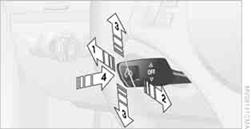
1. Storing and maintaining speed or accelerating
2. Storing and maintaining speed or decelerating
3. Deactivating cruise control
4. Resuming a previously stored speed
Briefly press the lever, arrow 1, or pull it briefly, arrow 2.
The car's current speed is stored and maintained. It is briefly displayed in the instrument cluster.
If the engine braking power is insufficient on a downhill slope, the set speed may be exceeded. On uphill grades vehicle speed may drop if the engine output is insufficient.
Increasing speedBriefly press the lever, arrow 1, until the desired speed is reached.
Each time the lever is pressed briefly, the speed is increased by approx. 1 mph/1 km/h.
Accelerating using the lever
Press the lever, arrow 1, until the desired speed is reached.
The vehicle accelerates without pressure on the accelerator pedal. The system stores and maintains the speed.
Decreasing speedRepeatedly pull the lever, arrow 2, until the desired speed is reached.
The functions here are the same as for increasing the speed or accelerating, except that the speed will be decreased.
Deactivating cruise controlPush the lever briefly upwards or downwards, arrow 3.
In addition, the system is automatically deactivated:
> When the brakes are applied.
> When the clutch of the manual transmission is engaged or the transmission is shifted
into neutral.
> When the automatic transmission selector lever is moved into the neutral position
N.
> When the selector lever of the Sports automatic transmission with double clutch
is moved into the neutral position N.
> When the vehicle travels faster or slower than the set speed for an extended period,
e.g. when the accelerator is depressed.
> When DTC is activated or DSC is deactivated.
> When DSC is intervening
Press the button, arrow 4.
The last stored speed is resumed and maintained.
The stored speed is briefly displayed in the instrument cluster.
The stored speed is cleared when the ignition is switched off.
Display in the instrument cluster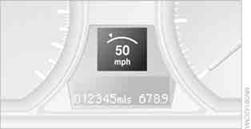
When the speed at which the vehicle is traveling is stored or when a stored speed is called up, the speed is briefly displayed in the instrument cluster.
See also:
Automatic locking
The setting is stored for the remote control currently
in use.
1. "Settings"
2. "Door locks"
3. Select the desired function:
▷ "Lock if no door is opened"
T ...
Planning a trip with intermediatedestinations
New trip
1. "Navigation"
2. "Map"
3. Move the controller to the left if necessary.
4. "Guidance"
5. "Enter new destination"
6. Select the type of destina ...
The concept
▷ Most functions that are displayed on the
Control Display can be operated by spoken
commands via the voice activation system.
The system prompts you to make your entries.
▷ Function ...