
Playback
Loading the CD/DVD player
Insert the CD/DVD with the printed side up.
Playback begins automatically.
Reading can take a few minutes with compressed audio files.
Starting playback
A CD/DVD is located in the CD/DVD player or DVD changer.
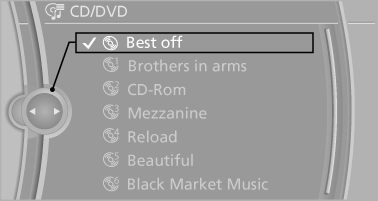
1. "CD/Multimedia"
2. "CD/DVD"
3. Select the desired CD or DVD.
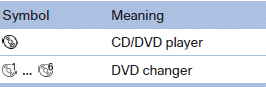
Playable formats
► DVD: DVD-ROM, DVD-R, DVD+R, DVDRW,
DVD+RW, DVD-R DL, DVD+R DL, DVD
audio (video part only), DVD video.
► CD-ROM, CD-R, CD-RW, CD-DA, VCD,
SVCD.
► Compressed audio files: MP3, WMA, AAC,
M4A.
CD/DVD removal
1.  Press the button.
The CD/DVD is partially ejected.
2. Remove the CD/DVD.
See also:
System limits
Top View cannot be used in the following situations:
▷ With a door open.
▷ With the tailgate open<>.
▷ With an exterior mirror folded in.
▷ In poor light.
The arrows ...
Selecting a station manually
Station selection via the frequency.
1. "Radio"
2. "FM" or "AM"
3. "Manual"
4. To select the frequency: turn the controller.
To store the station: press ...
Roadside Assistance
Service availability
Roadside Assistance can be reached around the
clock in many countries. You can obtain assistance
there in the event of a vehicle breakdown.
Roadside Assistance
The Roadside ...