
At a glance
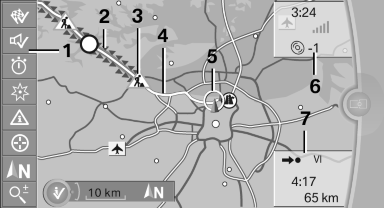
1 Function bar
2 Route section with traffic obstruction
3 Traffic sign for traffic obstruction
4 Planned route
5 Current location
6 Upper status field
7 Lower status field
Lines in the map
Streets and routes are displayed in different colors and styles depending on their classification.
Dashed lines represent railways and ferry connections.
Country borders are indicated by thin lines.
Traffic obstructions
Small triangles along the planned route indicate route sections with traffic obstructions, depending on the map scale. The direction of the triangles indicates the direction of the obstruction.
The traffic signs indicate the significance of the obstruction.
► Red traffic sign: the obstruction affects the
planned route or direction.
► Gray traffic sign: the obstruction does not
affect the planned route or direction.
Traffic bulletins.
Planned route
After destination guidance is started, the planned route is displayed on the map.
Status fields
Show/hide: press the controller.
► Upper status field: time, telephone, and entertainment
details.
► Lower status field: symbol for active destination
guidance, status of traffic bulletins,
time of arrival, and distance to destination.
Function bar
The following functions are available in the function bar:
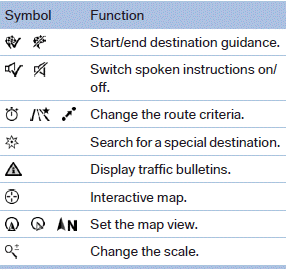
To change to the function bar, move the controller to the left.
See also:
Vehicle equipment
All standard, country-specific and optional
equipment that is offered in the model series is
described in this chapter. Therefore, equipment
is also described that is not available in a vehicle, ...
California Proposition 65 Warning
California laws require us to state the following
warning:
Engine exhaust and a wide variety of automobile
components and parts, including components
found in the interior furnishings in a vehi ...
Compartments in the doors
Do not stow any breakable objects
Do not store any breakable objects, e. g.
glass bottles, in the compartments, or there is
an increased risk of injury in the event of an accident.◄ ...