
Glove compartment
Front passenger side
Opening
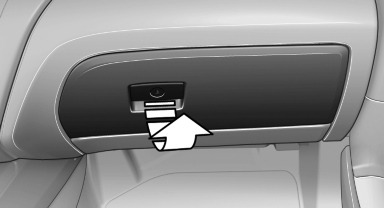
Pull the handle.
The light in the glove compartment switches on.
 Close the glove compartment again immediately
Close the glove compartment immediately after
use while driving; otherwise, injury may occur
during accidents.◄
Closing
Fold up the cover.
Locking
Lock glove compartment with an integrated key, refer to page 30.
Then the remote control device without an integrated key can be handed over, e.g. in the hotel. Access to the glove box is not possible.
USB interface for data transfer
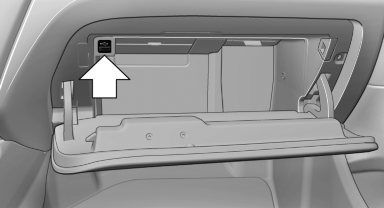
Connection for importing and exporting data on USB devices, e.g.:
► Personal Profile settings.
► Music collection.
Observe the following when connecting:
► Do not use force when plugging the connector
into the USB interface.
► Do not connect devices such as fans or
lamps to the USB interface.
► Do not connect USB hard drives.
► Do not use the USB interface to recharge
external devices.
See also:
Navigation data
Information on the navigation data
1. "Navigation"
2. Open "Options".
3. "Navigation system version": information on
the data version is displayed.
Updating the nav ...
Clock
The settings are stored for the remote control currently in use, refer also to
Personal Profile on page 28.
Setting the timeIn the instrument cluster
To set the 12h/24h format, refer to Se ...
Airbags
1. Front airbag, driver
2. Front airbag, front passenger
3. Head airbag
4. Side airbag
5. Knee airbags
Front airbags
Front airbags help protect the driver and front
passenger by responding t ...