
Split screen
General information
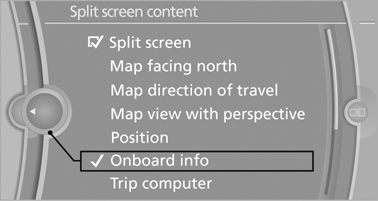
Additional information can be displayed on the right side of the split screen, e.g., information from the onboard computer.
In the divided screen view, the so-called split screen, this information remains visible even when you change to another menu.
Switching the split screen on and off
1.  Press the button.
2. "Split screen"
Selecting the display
1.  Press the button.
2. "Split screen"
3. Move the controller until the split screen is
selected.
4. Press the controller or select "Split screen
content".
5. Select the desired menu item.
See also:
Controls
The audio and video sources can be controlled using the:
> Buttons near the CD/DVD player
> iDrive
> Buttons on the steering wheel,
> Programmable memory keys,
> Voice activation s ...
Computer
Displays in the instrument clusterCalling up information
Press the button in the turn signal/high beam lever.
The following items of information are displayed in the order listed:
> Cruising ...
CD changer
The BMW CD changer for six CDs is behind the left side panel in the cargo area.
Removing the CD magazineTo insert or remove CDs from the CD magazine, you must first remove it from the
CD changer: ...