
Opening the Options menu
 Press the button.
The "Options" menu is displayed.
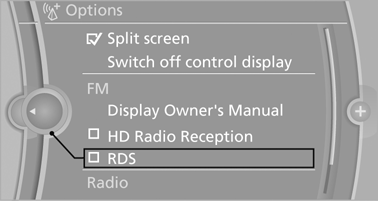
Additional options: move the controller to the right repeatedly until the "Options" menu is displayed.
Options menu
The "Options" menu consists of various areas:
► Screen settings, e.g., "Split screen".
This area remains unchanged.
► Control options for the selected main menu,
e.g., for "Radio".
► If applicable, further operating options for
the selected menu, e.g., "Store station".
See also:
Front: automatic transmission
Opening
Press on the cover.
Emptying
Take out the insert.
Lighter
Press on the cover
Push in the lighter.
The lighter can be removed as
soon as it pops back out.
Danger of burns
Only ...
Changing the list view
The list view changes every time the first symbol
on the navigation bar is pressed.
Information on the channel is displayed.
...
Snap-in adapter
The snap-in adapter is used to:
▷ Hold the mobile phone.
▷ Recharge the battery.
▷ Connect the mobile phone to an outside antenna
of the vehicle.
This provides for better netwo ...