
Tilt
Three different tilt positions are available.
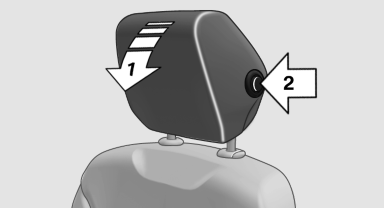
▷ Forward: pull the top edge of the head restraint forward, arrow 1.
▷ Back: press the button, arrow 2. The head restraint folds as far back as possible.
See also:
Compressed video files
Playback
1. Select the directory if necessary.
Compressed video files
2. Press the
button.
3. Select a track.
Select a track
4. Press the
button
5. Select "Play".
6. Press ...
Headphones, vehicle
loudspeakers
Connecting the headphones
Normal headphones
Connect via the jack 1/8"/3.5 mm, on the rear CD/DVD player.
Infrared headphones
Connection via the infrared interface on the
lower edge of the s ...
Check Control
The conceptThe Check Control monitors vehicle functions and alerts you to any malfunctions
in the systems monitored. Such a Check Control message includes indicator and warning
lamps in the instru ...