
Emergency Request
Requirements
▷ Equipment version with full preparation package mobile phone.
An Emergency Request can be made, even if no mobile phones are paired with the vehicle.
▷ BMW Assist is activated.
▷ The radio ready state is switched on.
▷ The BMW Assist system is logged in to a wireless communications network supported by BMW Assist.
▷ The Assist system is functional.
Only press the SOS button in an emergency.
 Emergency Request not guaranteed
For technical reasons, the Emergency Request
cannot be guaranteed under unfavorable
conditions.◀
Service contract
▷ After your contract with BMW Assist has expired, the BMW Assist system can be deactivated by the service center without you having to visit a workshop.
After deactivation, an Emergency Request is no longer possible.
▷ Under certain circumstances, the system can be reactivated by a service center after you sign a new contract.
Initiating an Emergency Request
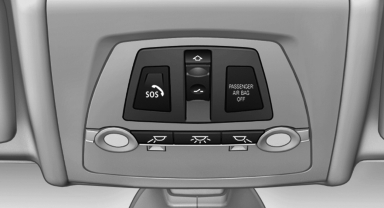
1. Press the cover briefly to open it.
2. Press the SOS button until the LED in the
button lights up.
▷ The LED lights up: an Emergency Request was initiated.
If the situation allows, wait in your vehicle until the voice connection has been established.
▷ The LED flashes if the connection to the BMW Assist Response Center has been established.
After the Emergency Request arrives at the BMW Assist Response Center, the BMW Assist Response Center contacts you and takes further steps to help you.
Even if you are unable to respond, the BMW Assist Response Center can take further steps to help you under certain circumstances.
For this purpose, data that are used to determine the necessary rescue measures, such as the current position of the vehicle if it can be established, are transmitted to the BMW Assist Response Center.
▷ If the LED is flashing but the BMW Assist Response Center cannot be heard on the hands-free system, the hands-free system may be malfunctioning. However, the BMW Assist Response Center may still be able to hear you.
Initiating an Emergency Request automatically
Under certain conditions, an Emergency Request is automatically initiated immediately after a severe accident. Automatic Collision Notification is not affected by pressing the SOS button
See also:
Example: playing back a CD
1. Switch on the Entertainment sound output
if necessary.
2. Press the button on the steering
wheel.
3. ›C D and multimedia‹
The medium last played is played back.
4. Press the button on the ...
Engine oil temperature
► Cold engine: the pointer is
at
the low temperature end.
Drive at moderate engine and
vehicle speeds.
► Normal operating temperature:
the pointer is in the middle
or in the ...
Glove compartment
Front passenger side
Opening
Pull the handle.
The light in the glove compartment switches on.
Close the glove compartment again immediately
Close the glove compartment immediately after
use ...