
Notes
Displaying notes
1. "Office"
2. "Notes"
All notes are displayed.
Displaying the note
1. Select the desired note.
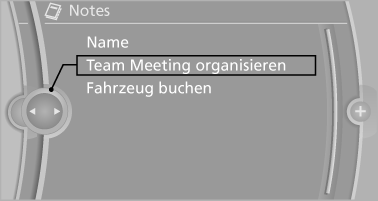
2. Scroll in the note if necessary:
▷ Turn the controller.
▷ 
 Select the symbol.
Using contact data
Contact data from appointments, tasks, text messages, e-mails and notes can be saved or selected
Reading the note out loud
Read the note out loud
See also:
Vehicle equipment
All standard, country-specific and optional
equipment that is offered in the model series is
described in this chapter. Therefore, equipment
is also described that is not available in a vehicle,
e ...
Destination entry by map
Selecting the destination
1. "Navigation"
2. "Map"
The current position of the vehicle is indicated
on the map.
3. "Interactive map"
4. Select the destination w ...
What Li Gets You
I'm not sure who will be shopping for a long-wheelbase 7 Series. Overseas,
they're the executive car of choice, allowing busy CEOs a space to decompress
between board meetings. Perhaps there are e ...