
Tasks
Displaying the task list
Display tasks that are due within the next 90 days.
1. "Office"
2. "Tasks"
Sorting the task list
1. Select the header in the task list.
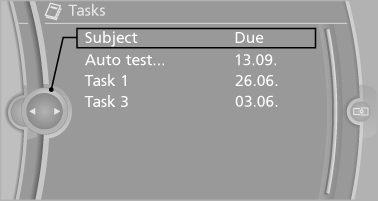
2. Select the sorting criterion:
▷ "Priority (!)"*
▷ "Subject"
▷ "Due date"
Displaying the task
1. Select the desired task.
2. Scroll in the task if necessary:
▷ Turn the controller.
▷ 
 Select the symbol.
Using contact data
Contact data from appointments, tasks, text messages, e-mails and notes can be saved or selected
Reading the task out loud
Read the task out loud
See also:
Car care products
BMW recommends using cleaning and care
products from BMW, since these have been
tested and approved.
Car care and cleaning products
Follow the instructions on the container.
When cleaning the ...
The concept
> The voice activation system can be used to control functions by spoken commands.
> Functions that can only used when the vehicle is stopped cannot be operated using
the voice activation sys ...
Locking separately
The trunk lid can be locked separately using the
switch in the front center armrest.
Trunk lid secured, arrow 1.
Trunk lid not secured, arrow
2.
Slide the switch into the arrow 1 posit ...