
New contact
General information
A contact can have up to 8 phone numbers, 2 addresses, 3 e-mail addresses and one Internet address.
1. "Office"
2. "Contacts"
3. "Options" Open.
4. "New contact"
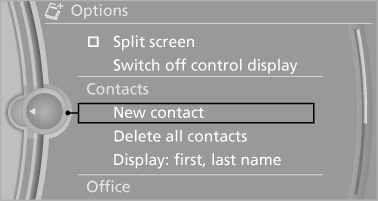
5. The entry fields are still filled with the previous
entries: "Delete input fields"
6. Fill in the entry fields: select the symbol next
to the entry field.
7. Enter the text and assign the contact type.
8. In the navigation system: enter address.
Only addresses contained in the navigation
data in the vehicle can be entered. This ensures
that destination guidance is possible
for all addresses.
If necessary, "Accept address".
9. "Store contact in vehicle"
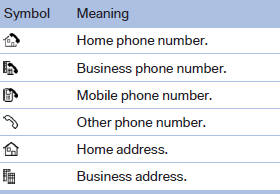
Contact types
Various contact types can be assigned to phone numbers and addresses.
Specifying the home address
A home address can be stored. It appears at the top of the contact list.
1. "Home"
2. Create a contact.
3. "Store contact in vehicle"
See also:
On the front passenger seat
After installing a child restraint fixing system on
the front passenger seat, ensure that the front
and side airbags on the front passenger side are
deactivated.
Deactivating the front passen ...
Rear entertainment
Vehicle equipment
All standard, country-specific and optional
equipment that is offered in the model series is
described in this chapter. Therefore, equipment
is also described that is not avai ...
Redialing
General information
The list of dialed numbers in the mobile phone
is transmitted to the vehicle depending on the
mobile phone. Possibly only those numbers are
displayed that were dialed from t ...