
Phone book
Displays
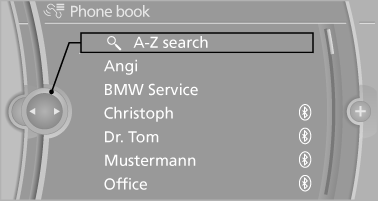
The phone book accesses the contacts and shows all contacts for which a phone number has been stored. The entries can be selected to make a call.
1. "Telephone"
2. "Phone book"
A symbol indicates the storage location of the contacts.
Calling a contact
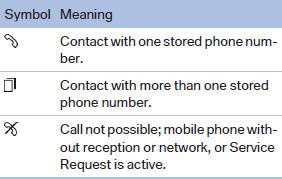
For contacts with one stored phone number: select the required contact. The connection is established.
For contacts with more than one stored phone number: select the required contact and the phone number. The connection is established.
Editing a contact
Changing the entries in "Contacts". When a contact is changed, the changes are not stored on the mobile phone. A copy of the entry is stored in the vehicle.
1. Highlight the contact.
2. Open "Options".
3. "Edit entry"
The contact can be edited.
See also:
What to do if...
Information on suitable mobile phones.
The mobile phone could not be paired or connected.
▷ Is Bluetooth activated in the vehicle and on
the mobile phone? Activate Bluetooth in the
vehicle ...
Manual transmission
Gearshift lever in neutral position.
Towing
Follow the towing instructions
Follow all towing instructions; otherwise,
vehicle damage or accidents may occur.
▷ Make sure that the ignition ...
Adjusting the volume
Adjusting the volume
Turn the knob until the desired volume is selected.
The setting is stored for the remote control
currently in use.
The vehicle automatically adjusts the volume of
the mic ...