
Entering a phone number
Dialing a number
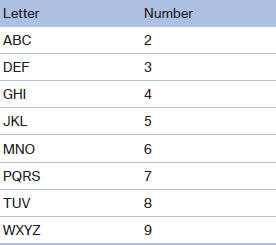
When entering phone numbers, you can switch between entering letters and numbers.
Service numbers can be entered more easily, e. g. 1-888-BMW-CARD.
1. "Telephone"
2. "Dial number"
3. Select the digits individually.
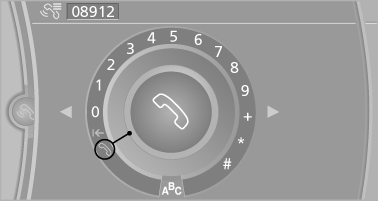
4. Convert to letters as required.
 Select the symbol.
Select the letters individually.
5.  Select the symbol.
 Select symbol to convert to
numbers.
Select symbol to convert to
numbers.
The phone number can also be entered by voice.
Only numbers can be spoken.
Letter/number assignment
See also:
Driving tips
This section provides you with information useful in dealing with specific driving
and operating conditions. ...
Low tire pressure message
The yellow warning lamp lights up. A
Check Control message is displayed.
▷ There is a flat tire or a major loss in
tire inflation pressure.
▷ The system was not reset after a wheel ...
Resuming cruising speed
Press button 4:
The stored speed is resumed and maintained ...