
Managing music
Albums
Renaming an album
The name of the album, if available, is automatically entered when the album is stored. If the name is not available, it can be changed later if desired.
1. "CD/Multimedia"
2. "Music collection"
3. Highlight the desired album.
4. Open "Options".
5. "Rename album"
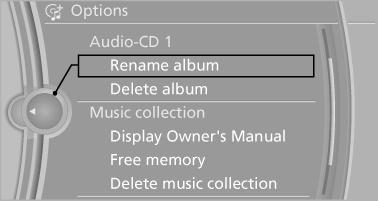
6. Select the letters individually.
Deleting an album
An album cannot be deleted while a track from that album is being played.
1. "CD/Multimedia"
2. "Music collection"
3. Highlight the desired album.
4. Open "Options".
5. "Delete album"
Deleting a track and directory
A track cannot be deleted while it is being played.
A directory cannot be deleted while a track from that directory is being played.
1. "CD/Multimedia"
2. "Music collection"
3. Highlight the directory or track.
4. Open "Options".
5. "Delete folder" or "Delete track"
Free memory capacity
Display the free memory capacity in the music collection.
1. "CD/Multimedia"
2. "Music collection"
3. Open "Options".
4. "Free memory"
Music collection
Backing up the music collection
The entire music collection can be stored on a USB device. Make sure there is enough free memory capacity on the USB device.
Depending on the number of tracks, backing up the music collection may take several hours.
Therefore, it is best to perform the backup during a long trip.
1. Starting the engine.
2. Connect the USB device to the USB interface
in the glove compartment.
3. "CD/Multimedia"
4. "Music collection"
5. Open "Options".
6. "Music data import/export"
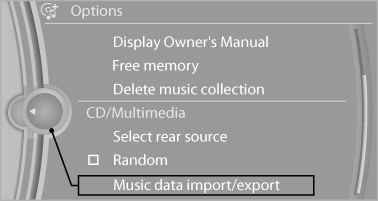
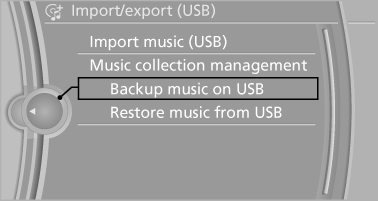
7. "Backup music on USB"
Storing the music collection in the vehicle
When storing from the USB device, the existing music collection in the vehicle is replaced.
1. "CD/Multimedia"
2. "Music collection"
3. Open "Options".
4. "Music data import/export"
5. "Restore music from USB"
Deleting the music collection
1. "CD/Multimedia"
2. "Music collection"
3. Open "Options".
4. "Delete music collection"
See also:
Switching the interior lamps on and off
Press the button.
To switch off permanently: press the button for
approx. 3 seconds.
To clear this setting: press the button. ...
Overview
The world debut of the new BMW 5-Series Sedan marks the epitome of modern
design and driving pleasure in the world of premium midsize sedans. Through its
athletic and executive looks, driving dyna ...
Reminders
Displaying reminders
Reminders of pending appointments and tasks
are displayed. After an appointment or after a
task is due, the reminder is no longer displayed.
1. "Office"
2. " ...