
Playback
Loading the CD/DVD player
Insert the CD/DVD with the printed side up.
Playback begins automatically.
Reading can take a few minutes with compressed audio files.
Starting playback
A CD/DVD is located in the CD/DVD player or DVD changer.
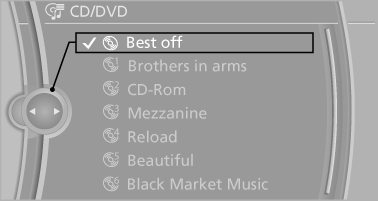
1. "CD/Multimedia"
2. "CD/DVD"
3. Select the desired CD or DVD.
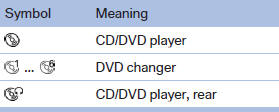
Playable formats
▷ DVD: DVD-ROM, DVD-R, DVD+R, DVDRW,
DVD+RW, DVD-R DL, DVD+R DL, DVD
audio (video part only), DVD video.
▷ CD: CD-ROM, CD-R, CD-RW, CD-DA, VCD,
SVCD.
▷ Compressed audio files: MP3, WMA, AAC,
M4A.
CD/DVD removal
1.  Press the button.
The CD/DVD is partially ejected.
2. Remove the CD/DVD.
See also:
Map view for split screen
The map view can be selected for the split
screen independently from the main screen.
1. Open "Options".
2. "Split screen"
3. Move the controller to the right repeatedly
unt ...
General information
The interior lamps, footwell lamps, exit lamps,
cargo area lamps and courtesy lamps are controlled
automatically.
The courtesy lamps have LED lights in the door
handles to illuminate the exteri ...
New contact
1. "Contacts"
2. "New contact"
3. If input boxes are already filled with previous entries: "Delete input
fields"
4. To fill in the entry fi ...