
Route criteria
General information
▷ The route calculated can be influenced by
selecting certain criteria.
▷ The route criteria can be changed when the
destination is entered and during destination
guidance.
▷ Road types are part of the navigation data
and are taken into consideration when planning
a route, e.g., avoid highways.
▷ The recommended route may differ from the
route you would take based on personal experience.
▷ The settings are stored for the remote control
currently in use.
▷ Destination guidance with traffic bulletins
Changing the route criteria
1. "Navigation"
2. "Map"
3. 

 "Route preference"
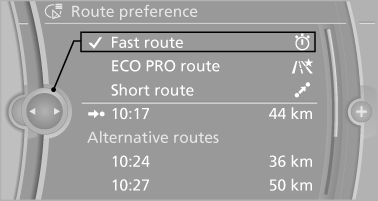
4. Select the criterion:
▷  "Fast route": time-optimized
route,
being a combination of the shortest possible
route and the fastest roads.
"Fast route": time-optimized
route,
being a combination of the shortest possible
route and the fastest roads.
▷  "ECO PRO route": optimized
combination
of the fastest and shortest
route.
"ECO PRO route": optimized
combination
of the fastest and shortest
route.
▷  "Short route": short distance,
irrespective
of how fast or slow progress will
be.
"Short route": short distance,
irrespective
of how fast or slow progress will
be.
▷ "Alternative routes": if available, alternative
routes are suggested during active
route guidance.
The individual suggestions are highlighted in color.
5. Specify additional criteria for the route, if necessary:
▷ "Avoid highways": highways are
avoided wherever possible.
▷ "Avoid toll roads": toll roads are avoided
wherever possible.
▷ "Avoid ferries": ferries are avoided
where possible.
See also:
System limits
Check the traffic situation as
well
PDC cannot serve as a substitute for the
driver's personal judgment of the traffic situation.
Check the traffic situation around the vehicle with your own e ...
BMW X5: rear window wiper
BMW X5: rear window wiper
1. Intermittent wipe
When reverse gear is engaged, the system
switches to continuous operation
2. Cleaning the rear window
Do not use the washing mechanisms
when ...
Actions in the event of a flat tire
Normal tires
1. Identify the damaged tire.
Do this by checking the air pressure in all
four tires.
If the tire inflation pressure in all four tires is
correct, the Tire Pressure Monitor may no ...