
Address book
Selecting a destination from the address book
1. "Navigation"
2. "Address book"
Contacts with addresses are displayed if these have been checked as destinations.
If the mobile phone does not display the contacts with addresses, they must first be checked as a destination
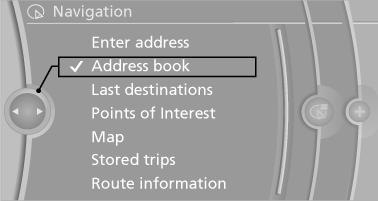
3. Select a contact in the list or, if desired, with
"A-Z search".
4. "Business address" or "Home address"
Storing the destination in the address book
After entering the destination, store the destination in the address book.
1. "Navigation"
2. "Map"
3.  "Guidance"
4. "Options" Open.
5. "Store as new contact" or "Add to existing
contact"
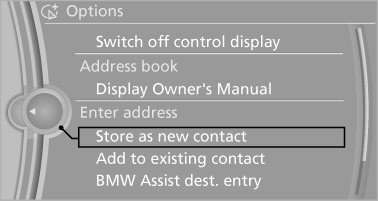
6. Select an existing contact, if available.
7. "Business address" or "Home address"
8. Enter "Last name" and, if necessary, "First
name".
9. "Store in vehicle"
Storing the position
The current position can be stored in the address book.
1. "Navigation"
2. "Options" Open<>.
3. "Store position as contact" or "Add position to contact"
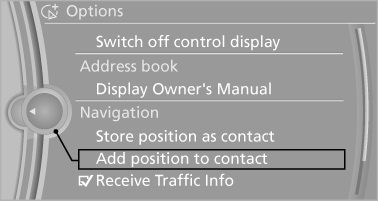
4. Depending on the selection, choose an existing
contact from the list. Select the type
of address and enter the first and last names.
5. "Store in vehicle"
Editing or deleting an address
1. "Navigation"
2. "Address book"
3. Highlight the entry.
4. "Options" Open.
5. "Edit in Contacts" or "Delete entry"
Using the home address as the destination
The home address must be stored. Specify the home address
1. "Navigation"
2. "Address book"
3. "Home"
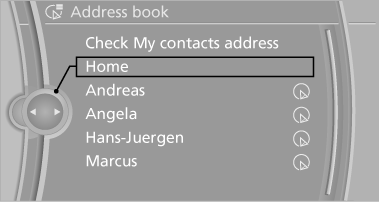
4. "Start guidance"
See also:
2011 BMW X3 Review by Mike Hanley
The BMW X3 may have been a pioneer among compact luxury crossovers, but a
number of competitors — including the Audi Q5, Mercedes-Benz GLK-Class and Volvo
XC60 — have entered the fray since its de ...
One lever for all functions
One lever for all functions
1 Storing and maintaining speed or accelerating
2 Storing and maintaining speed or decelerating
3 Interrupting and deactivating the system
4 Resuming a speed stored b ...
Capturing the image
The image is captured by two cameras
integrated in the exterior mirrors and by the
backup camera.
The range equals:
approx. 10 ft/3 m to the side.
approx. 7 ft/2 m to the rear.
In this w ...